How to Delete Your Cardely Account
Last updated: May 2026
This page explains how Cardely users can permanently delete their account. Once your account is deleted, your data cannot be recovered.
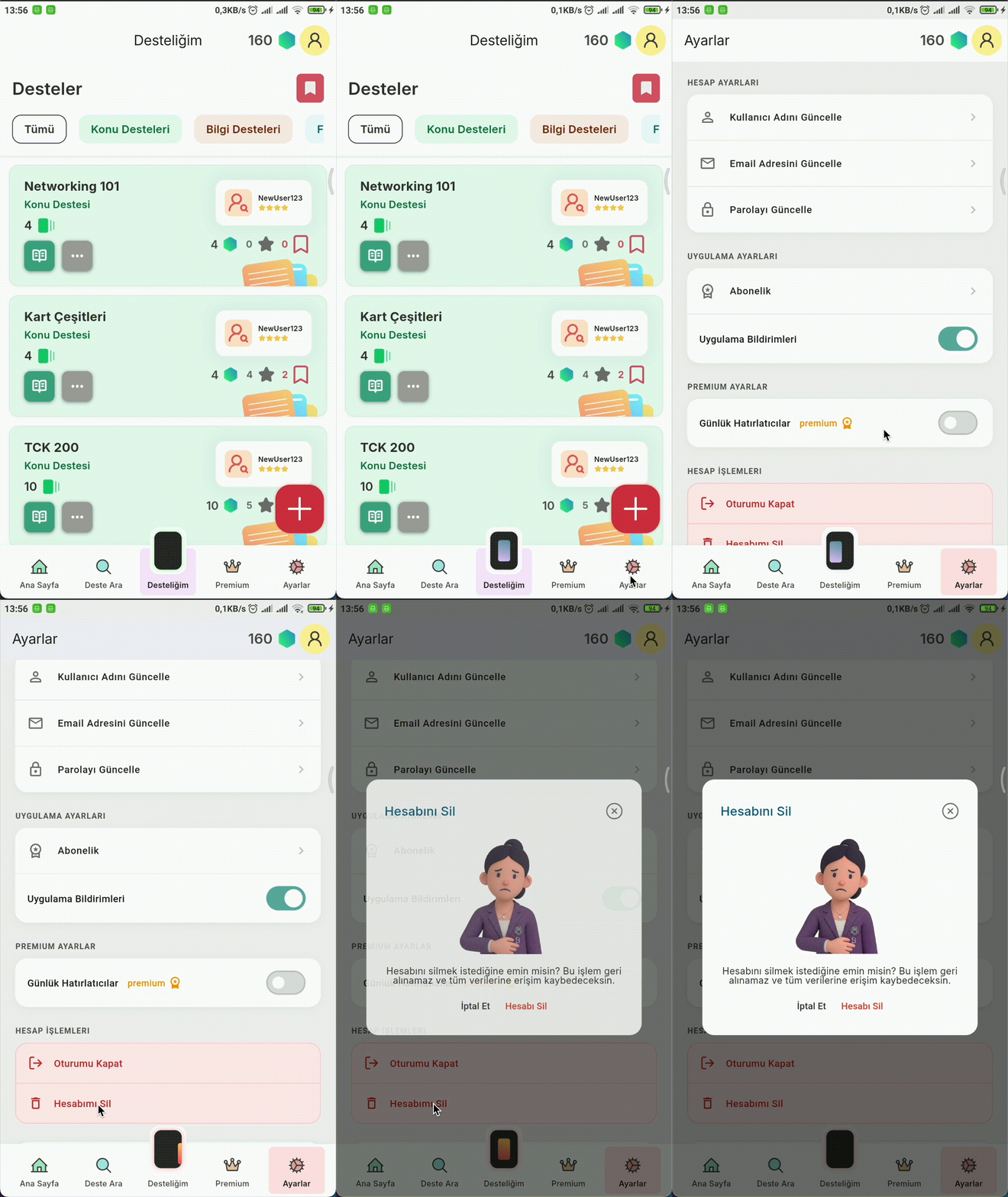
Account Deletion Steps
-
1
Open the Cardely app.
-
2
Tap the Settings tab in the bottom navigation bar.
-
3
Find and tap "Delete Account".
-
4
Confirm the deletion on the confirmation screen. Your account and all associated data will be permanently removed.
Visual Guide
Data That Will Be Deleted
When you delete your account, the following data is permanently and immediately removed:
- Account information (name, email address, password)
- All decks and study cards you created
- Study session history and progress data
- Saved decks and preferences
Data Retention Policy
Once account deletion is complete, all data listed above is removed immediately and permanently. No additional retention period applies; your data is not held in any system after deletion.
Help or Support
If you experience any issues deleting your account, or if you would like to submit a deletion request by email, you can reach us at:
merhaba@cardely.app